An exhausted IT engineer trudges through an endless cubicle corridor under fluorescent light, carrying a single coral coffee mug.

Founder: 25 years • 100+ Projects • 20k users

Was your dream to be a Test User?

Become an architect (again)

The boring desktop work runs itself. You get the architect work back.

Get a plan, an agent, and your first change is coached.

Citrix Azure VMware AWS Anthropic OpenAI Google Gemini NetScaler

Founder: 25 years • 100+ Projects • 20k users

Citrix Azure VMware AWS Anthropic OpenAI Google Gemini NetScaler
DeskOps
August 2026

Hi, I’m Skip Miller

25 years as a desktop architect. Now automating enterprise projects

To the architects still testing by hand: there’s a better way.

If you run network ops or virtual desktops, you know the loop: sign in, test, reset, repeat. A small change can take days of tedium.

So I built the Desk-Ops Agent, a secure desktop service that tests every change the way your users work — point, click, observe. Claude Code writes the “vibe-coded” planned backend or desktop change; Desk-Ops proves it on a real desktop. The deployment loop closes end to end automatically: you’re the architect again.

A desktop agent that tests Claude’s backend changes
Diagram: Architect Workstation (research, plan, build with Claude Code + Desk-Ops) sends goals and tasks to the Test Workstation, which clicks, types, and observes real end-user behavior and returns video, images, and results

It doesn't take long to get started but it could change your life.

— Skip Miller

Founder, Desk-Ops

“If your company staff are struggling with tedious user testing and mounting “technical debt” then Desk-Ops automation is the perfect choice.”

From prompt to proof

How Desk-Ops works

Desktop architects should not have to spend days manually proving every change. You set the goal in Claude, research the current guidance, and approve the plan.

Desk-Ops then safely runs the work on a real test VM and repeats until the goal passes or a safety check stops the run.

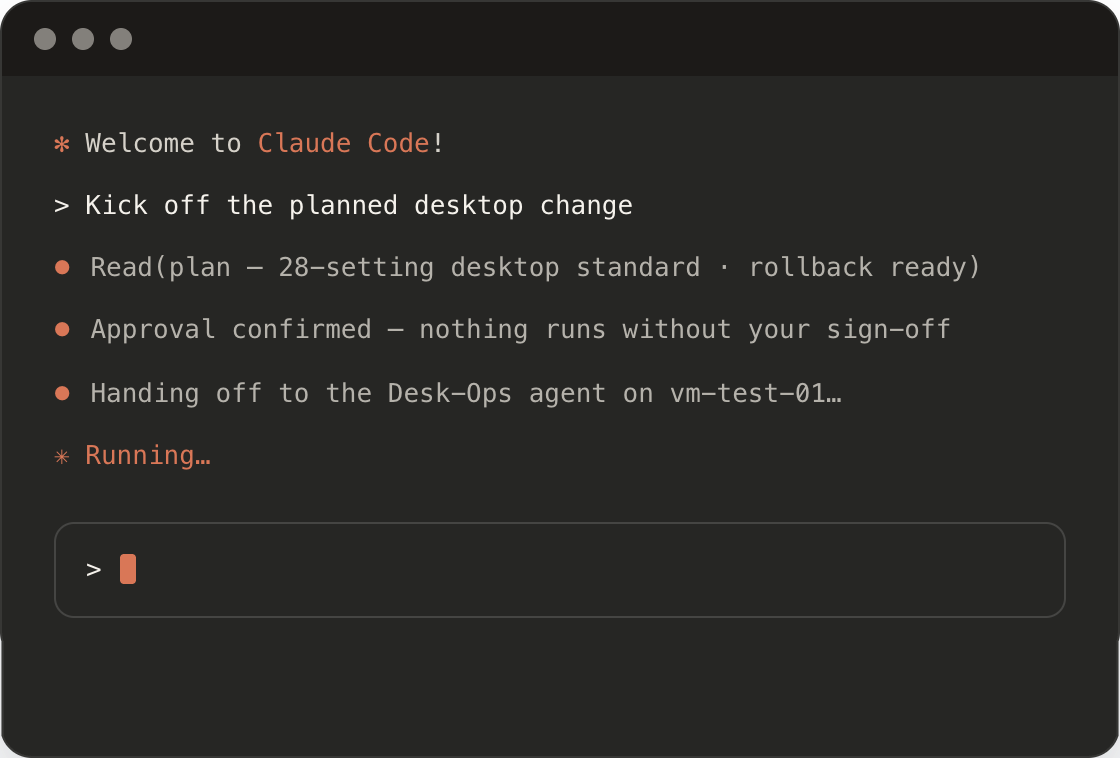
Claude Code terminal: kick off the planned desktop change
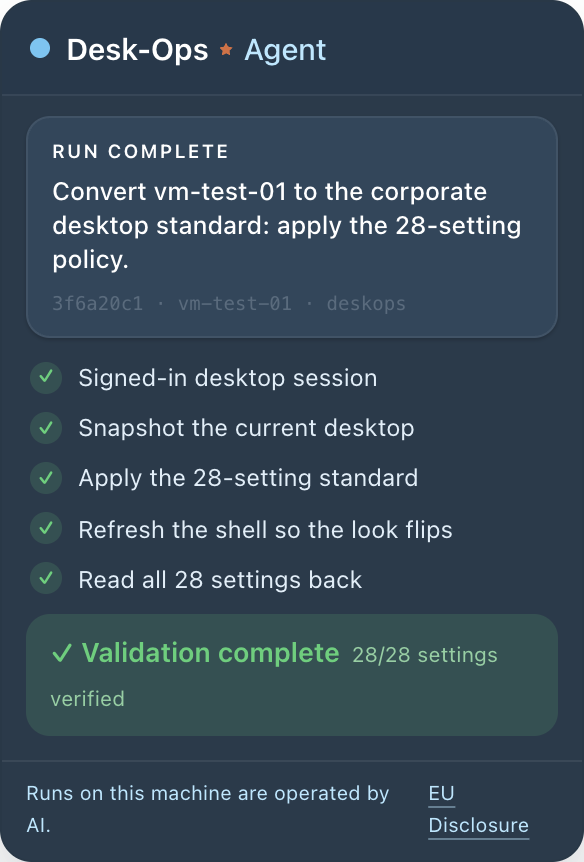
Desk-Ops agent panel: run complete, 28/28 settings verified
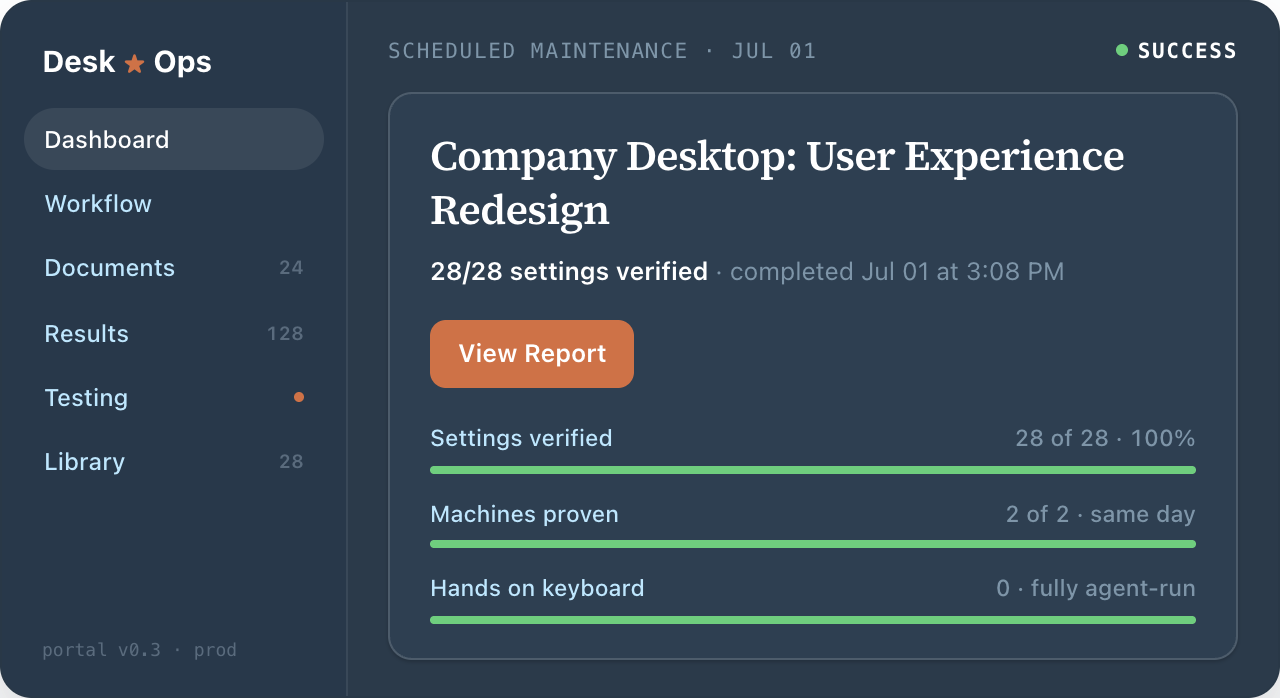
Desk-Ops portal dashboard: scheduled maintenance result, success
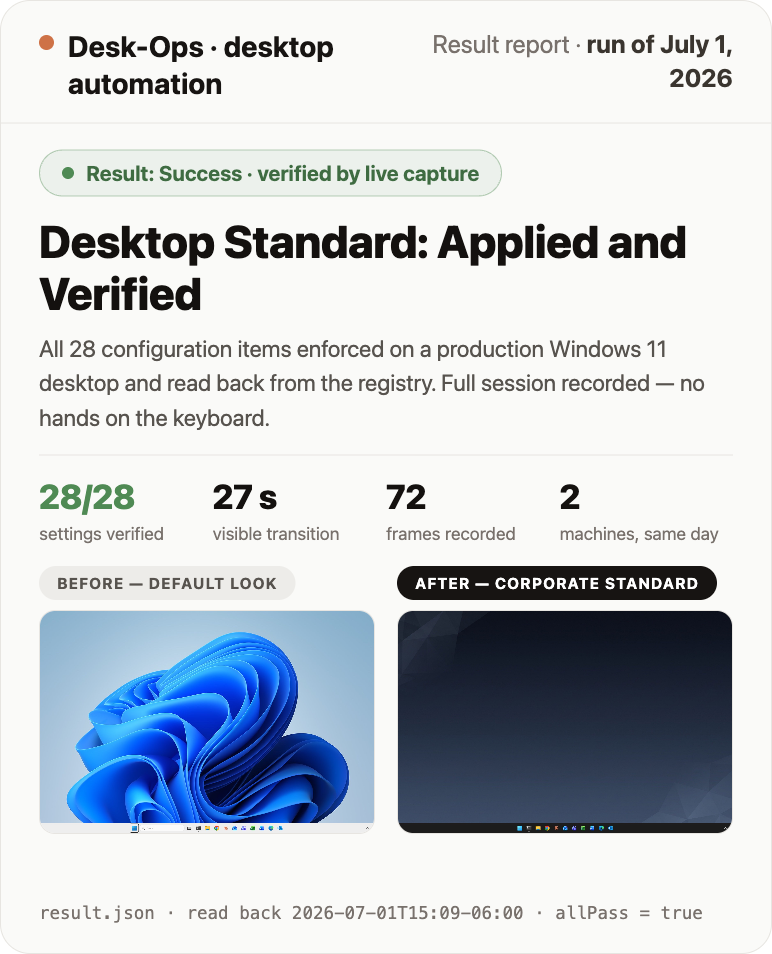
Result report: desktop standard applied and verified

See our in-progress work on the Web Portal, the Desk-Ops Agent, and a real Test Report.

Software and Professional Services

Here is what you get with a Desk-Ops Pilot Project

We install a supervised agent on your test VM, run one real change from your backlog, and return the video, registry read-back, and change-approval report.

Here is the order: a written plan first, then the install, then your first real backlog item, then the report. The install runs over one outbound connection, no VPN, no inbound ports.

Here is an overview of a Manual vs Desk-Ops workflow:

Manual
Plan
weeks
Proof of concept
days
Manual item tests
endless
Deploy then triage
weeks
Desk-Ops
Plan
hours
Proof of concept
hours
Automated item tests
minutes
Deploy with proof
hours

Here are some of the benefits:

  • Research - deeply - before it acts — across your documentation, knowledge base, and estate.
  • Simplifies - Holds years of technical debt in context without losing the thread. Untangles complexity like only AI can.
  • Plans, runs, tests, and refines - Make changes in one supervised loop.
  • Treats change like code — written, approved, traceable, and proven.
  • Reports - Returns technical evidence and an executive-ready report.
After the Pilot: You keep the agent

When you put it to work, it's one flat monthly rate.

After the paid pilot, Desk-Ops stays installed on your test VM, ready for the next backlog item. You're on a flat monthly rate, month to month. Thirty days' notice either way, no auto-renew.

Every run goes on the invoice at zero, so testing never adds a line item. You sign off on a number, a date, and a scope. No current project, no charge. What comes back is planned, tested, and documented.

We think you’ll keep finding work for it and we intend to earn that on every run. Let's discuss a pilot project plan.

Get a plan, an agent, and your first change is coached.

install

Done-with-you On Premise Install

Key Vault sandbox credential, agent installed on your test VM over the Azure Arc channel, restricted-port safe copy. You never hand over a production credential — the agent gets a sandboxed one, scoped to a copy of your environment.

plan

A Written Plan for your first pilot

Before anything runs, you get a written PoC plan: goals stated as pass/fail tests, not adjectives. You read it, you approve it, then the agent starts.

control

Claude Code Integration (yours)

You confirm the result from your own Claude Code seat, not our demo environment. If it passes, it passes on your machine, under your login, where you can check it yourself.

evidence

Full Log and Video Test Results

We run at least one real item from your backlog and return the proof: video of the run, a registry read-back, and a change-approval report. A run that fails cannot be passed off as green: the harness re-checks the machine and does not take the agent's word for it. Not a canned scenario — your problem.

coaching (training and safety)

We require sandboxing and safety

A named person at your company runs every change with our architect alongside during the coach period. They hold the keys and get shared office hours and ongoing coaching options.

human architect (optional)

Planning, design, and execution

If you'd like enterprise-grade deployment combining the power of more than 25 years of experience, frontier AI models, and our desktop agent completing the "loop" for the best desktop and change automation money can buy today. This is what you'd request.

Real clients · 25 years · 100+ deployments
“Over the last 12 months Skip has provided our company (4 locations, $90mil revenue) with expert (Citrix) service. Skip was able to determine the causes of the latency between the networks that 3 previous consulting companies could not resolve. Skip is very ethical and is a true professional. Skip tends to think outside the box when troubleshooting issues. I would recommend Skip Miller to anyone that needed a ‘Best’ (Citrix) consultant.”
Jon RossiOperations Manager, Power Motive Corp

Bring the change you're tired of hand-testing.

We'll write a concrete plan, deploy your agent, and prove your first change by day 14.

Get a plan, an agent, and your first change is coached.

Slots typically open within a few weeks.

Thanks!

Skip Miller

Skip Miller

Enterprise AI Architect

After 25 years and 100-plus production deployments, I care about one thing: changes that ship without breaking anyone’s morning.

For the last two years I’ve rebuilt that practice around a loop: Claude Code makes the change, a real desktop proves it, and the run repeats until it’s right. Desk-Ops is that loop pointed at the grind I know best: deploying, managing, and testing desktops, delivered like code.

Enterprise background

  • 25 years consulting
  • 20,000+ virtual desktops
  • 100+ production deployments
  • Azure / Citrix DevOps expert
  • Hybrid cloud architect

Certifications

  • Azure Administrator (AZ-104)
  • Azure Virtual Desktop (AZ-140)
  • Citrix CCA-V
  • Previously: MCSE, Cisco CCNA

Career highlights

Architected 100+ Citrix / AVD / NetScaler deployments: secure hybrid VDI for firms from 50 seats to 20,000.

Enabled 20,000+ users across healthcare, legal, manufacturing, and multi-tenant MSPs.

Tahoe Forest Hospital: Epic Citrix turnaround, medical VDI with App Layers and HA NetScalers.

PreviewRoadmap · in progress Open in a full tab
Join the waitlist

Get your first change proven.

I onboard a few environments at a time so the work stays good. Tell me what you run and I’ll add you to the list. When a slot opens you get a plan, an agent, and your first change is coached. Two minutes, no obligation.

Please enter your name.
Please enter a valid work email.
Please enter your company.
Desk-Ops · desktop automation
Prepared for review · live capture, July 1, 2026
Live run — no simulation, no mockups
Every desktop the same. And this time, you can prove it.

How do you know a desktop standard actually landed — every setting, every machine? On July 1 an AI agent signed into a working Windows 11 virtual desktop, enforced the corporate standard — theme, wallpaper, taskbar, Start menu, policy — and read all 28 settings back from the registry to prove the machine ended compliant. Nobody touched a keyboard. This page is the receipt.

28/28
settings verified in the registry
27 s
of wall time, end to end
72
frames captured as evidence
2
machines proven, same day